Multimedia internet TV app with great HD support
Miro (formerly known as Democracy Player) is one of the most well known internet TV apps out there aggregating content from everything from Hulu to YouTube.
Top Recommended Alternative

First let's make it clear that Miro doesn't provide any of it's own original content - it's an aggregator that tries to bring together media from many different sources, but in a more organized and logical way. I guess you could say it's an attempt to bring some kind of order to all the content out there. It also allows you to view videos on stored on your Mac meaning that Miro is trying to be a one stop player for all your video needs.
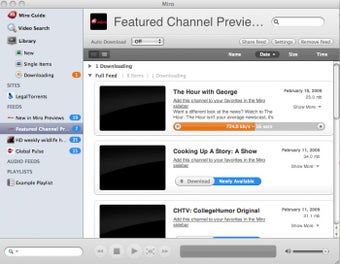
One of the big advantages of using Miro is that it allows you to subscribe to content via RSS feeds or BitTorrent. So for example, if you never want to miss another episode of Democracy Now, Miro will allow automatically download each episode for you so that it's ready and waiting the next time you open it. Of course, you can also use Miro to simply subscribe to YouTube channels as well.
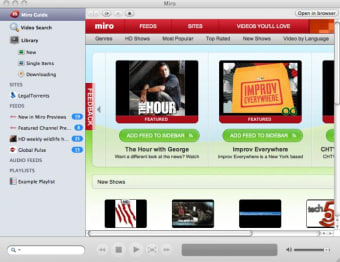
There are tons of other features in Miro too such as the ability to watch contents directly on LegalTorrents.com - as the name suggests, all content is 100% legal - view content by most popular, most highly rated, by genre, language and most recently, HD content only.
On the downside, I found Miro rather hard to digest in one go. There is so much going on within the interface in terms of content that it's difficult to know where to begin. In the end, I opted to choose content by genre which isn't as well highlighted as it should be. At least this way, I felt I brought some kind of order to Miro. I also found that a lot of the content I wanted to watch was only available on Hulu and only to those in the USA. On the plus side, I like the overall presentation of Hulu, the way it downloads programs instantly and most of all, the way it suggests other channels I may be interested in when viewing a program.
Miro is elegant and an excellent idea although you won't be able to view all of the content you want to and you may find it a bit overwhelming at first.
Song information and Album art lookup: · Clean up your music collection by automatically looking up the Artist, correct title, and album name and artwork among other thing. Album View: · A clean view to group together all your songs by Album and Artist. Also a simplified way to view video items by kind (Movies, Clips, Podcasts…) Faster Device Syncing and Conversions: · We’ve added a Quick fill option to get your music onto your device fast! Automatic syncing, options to convert only when necessary, and updates to the ffmpeg binaries. eMusic in the Stores section: · Purchase music from eMusic and add it straight to your library. Download HD videos from Vimeo feeds: · When available, you can now download HD quality videos from Vimeo podcasts. Massive updates to the Windows backend: · From playback to gui display to libtorrent, everything is updated and upgraded.